How to Turn Business Cards Into Sales Opportunities: A Practical Guide for Sales Teams
For sales professionals, meeting a potential customer is only the beginning. A conversation at a business event, trade show, networking meeting, or client visit can create a valuable sales opportunity. But once the event is over, the real challenge begins: How do you remember everyone you met and follow up at the right time? Many salespeople still keep business cards in their wallets, on their desks, or scattered across different notebooks and apps. Over time, important contact information can easily be forgotten. The problem is not a lack of leads.
The problem is how those leads are managed after the first meeting.
In this article, we will explore practical ways for sales professionals and sales teams to turn business cards into organized sales opportunities.
1. A Business Card Is More Than Contact Information
A business card contains more than a person's name, phone number, email address, and company.
For a salesperson, it can represent:
- A potential customer
- A business partner
- A future opportunity
- A referral source
- An existing customer
- A valuable networking connection
Imagine attending a trade show and collecting 50 business cards.
If you simply put those cards into a drawer, you may have 50 contacts — but you don't necessarily have 50 sales leads.
The value comes from what happens after you collect the contact information.
This is why effective business card management for sales is so important.
2. Organize Contacts Immediately After Networking
One of the biggest mistakes salespeople make is waiting too long to organize new contacts.
After several days, it becomes difficult to remember:
- Where you met the person
- What you discussed
- What product they were interested in
- Who introduced you
- What the next step should be
A simple solution is to process business cards immediately after a meeting or event.
For example:
Before the event
Prepare your contact management system.
During the event
Collect business cards and make short notes about important conversations.
After the event
Digitize the contacts and categorize them while the information is still fresh.
This simple workflow can significantly improve the quality of your follow-up.
3. Separate Contacts by Sales Priority
Not every contact deserves the same follow-up strategy.
A useful approach is to divide new contacts into three groups.
High-Priority Leads
These are people who:
- Have a clear business need
- Asked about your product or service
- Requested a proposal
- Showed strong interest
- Have decision-making authority
These contacts should receive follow-up as soon as possible.
Potential Leads
These people may have a potential need but are not ready to buy yet.
For example, they may say:
"Let's talk again next month."
These contacts should enter your follow-up pipeline.
Networking Contacts
These are people who may not be immediate prospects but could become valuable connections in the future.
Don't ignore them.
Good sales relationships often start long before the actual purchase.
4. Follow Up While the Conversation Is Still Fresh
Timing matters in sales.
If someone meets 20 companies at a trade show, they may receive dozens of emails afterward.
A generic message such as:
"Nice to meet you at the event. Please let me know if you are interested in our service."
is easy to ignore.
Instead, reference something specific from the conversation.
For example:
"It was great speaking with you at the Tokyo Business Expo. You mentioned that your sales team is currently managing customer contacts across Gmail and spreadsheets. I thought our solution might be relevant to your workflow."
This approach feels personal because it connects the follow-up message to the original conversation.
The goal is not simply to follow up.
The goal is to continue the conversation.
5. Add Context to Every Sales Contact
Contact information alone is not enough.
A strong sales database should also answer:
"Why is this person important?"
For each new contact, consider recording:
- Where you met
- Date of the meeting
- Company
- Job title
- Business needs
- Products discussed
- Potential opportunity
- Next action
- Follow-up date
For example:
| Contact | Company | Source | Interest | Next Action |
|---|---|---|---|---|
| John Smith | ABC Corp | Trade Show | CRM | Send demo |
| Sarah Lee | XYZ Ltd | Referral | Business Card | Call next week |
| David Kim | DEF Inc. | Networking | Partnership | Follow up next month |
This information turns a simple contact list into a useful sales resource.
6. Don't Let Business Cards Become a Data Entry Problem
Traditional business card management has another problem: manual data entry takes time.
A salesperson may collect dozens or hundreds of cards during events.
Manually entering:
- Name
- Company
- Phone number
- Job title
- Address
can quickly become repetitive.
This is where a business card scanner with OCR can help.
Instead of manually typing information, salespeople can scan a business card and automatically convert the printed information into digital contact data.
With AI-powered recognition, this process becomes even more useful for international sales teams dealing with different languages and business card formats.
7. Share Sales Contacts With the Team
Another common problem happens when sales contacts belong to individuals rather than the company.
For example, one salesperson attends an exhibition and collects 100 business cards.
If all those contacts remain on the salesperson's phone or desk, other team members may not know:
- Who the contacts are
- What was discussed
- Whether someone has already contacted them
- Which opportunities are active
A shared contact management system allows sales teams to create a common source of customer information.
This becomes particularly valuable when:
- Salespeople change roles
- Employees leave the company
- Multiple salespeople work with the same customer
- Managers need visibility into networking activities
The company should own the customer relationship — not an individual spreadsheet.
8. Connect Networking With Your Sales Pipeline
Collecting contacts is not the final goal.
The real objective is to create sales opportunities.
A simple process can look like this:
Business Card → Digital Contact → Qualification → Follow-Up → Meeting → Proposal → Opportunity → Customer
This creates a bridge between offline networking and digital sales management.
Without this process, a company may spend thousands of dollars attending trade shows without knowing how many meaningful opportunities were generated.
9. Use a Digital Business Card Management Tool
For sales teams that frequently attend exhibitions, conferences, networking events, or client meetings, a digital business card management solution can make contact collection much easier.
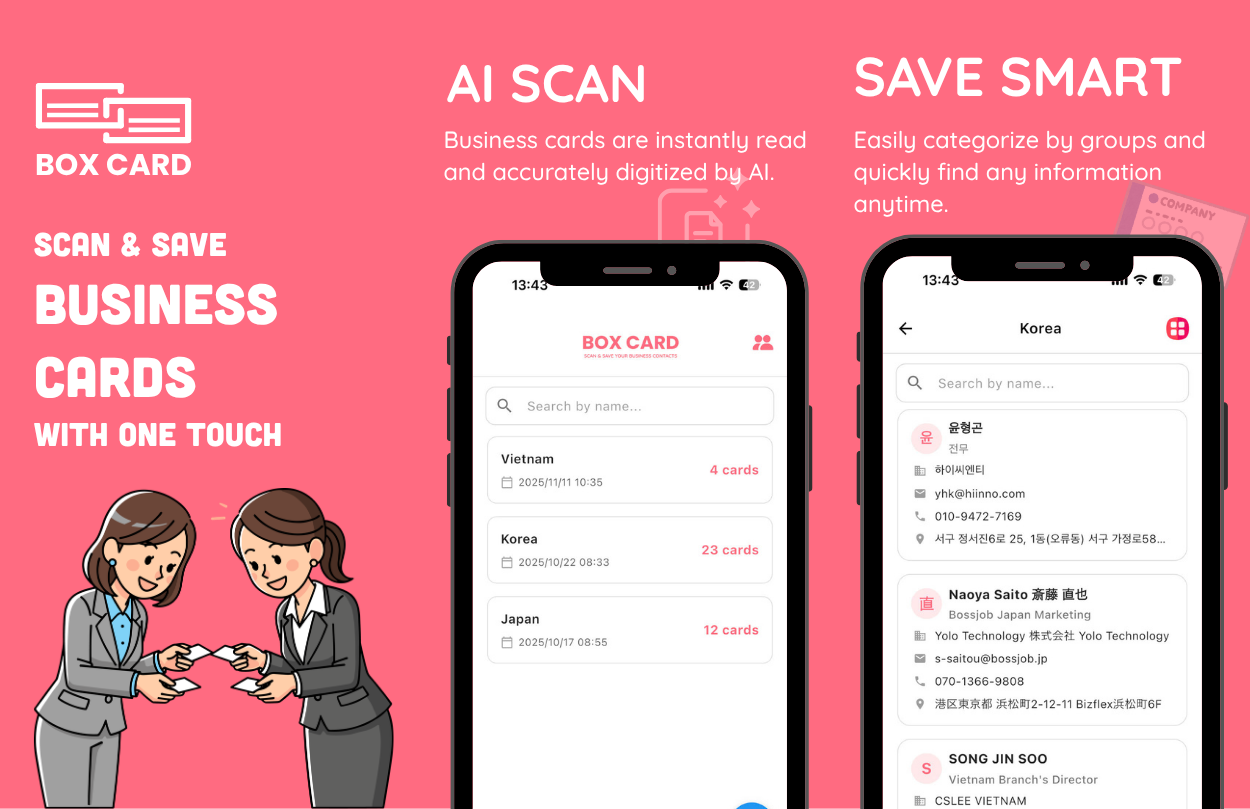
Boxcard is designed to help users digitize and organize business cards using AI-powered scanning.
Instead of keeping physical cards in different places, salespeople can scan them and store contact information digitally.
Useful capabilities include:
- AI business card scanning
- OCR-based contact recognition
- Cloud contact storage
- Contact sharing
- Multi-language support
- Excel/CSV export
- Team contact management
This allows salespeople to move from "I collected this business card" to "I know exactly what to do with this contact."
10. Create a Simple Follow-Up Routine
You don't need a complicated sales process to improve your results.
A simple routine can be enough.
Within 24 Hours
Digitize new business cards and add important notes.
Within 48 Hours
Send personalized follow-up messages to high-priority prospects.
Within 7 Days
Schedule calls or meetings with qualified leads.
Within 30 Days
Review contacts that have not responded and determine the next action.
Every Month
Review your networking contacts and identify opportunities that may have become relevant.
Consistency is more important than complexity.
11. Measure the Value of Networking
Sales teams should not only measure how many business cards they collect.
More useful metrics include:
Number of new contacts
How many relevant contacts did you acquire?
Qualified leads
How many contacts have a real business need?
Meetings generated
How many conversations became meetings?
Opportunities created
How many meetings became actual sales opportunities?
Conversion rate
How many networking contacts eventually became customers?
For example:
200 business cards → 80 qualified leads → 30 meetings → 10 opportunities → 3 customers
Now the sales team can understand the actual value of attending an event.
Conclusion
Business cards are still an important part of sales and networking, especially at trade shows, conferences, and face-to-face meetings.
But collecting business cards is only the first step.
The real sales advantage comes from having a system to:
- Digitize contacts quickly
- Add context to each relationship
- Prioritize potential customers
- Follow up at the right time
- Share information with the sales team
- Connect contacts with sales opportunities
- Measure the results
With the right workflow and tools, a pile of business cards can become something much more valuable:
a structured source of sales opportunities.
If your sales team regularly meets customers and business partners offline, improving the way you manage business cards can be one of the simplest ways to improve your follow-up process.
Start with every business card you collect — and make sure none of your potential opportunities get lost.
About Boxcard
Boxcard is an AI-powered business card scanning and contact management solution designed to help professionals and sales teams digitize, organize, and share business contacts more efficiently.
Scan a business card, save the information digitally, and keep your sales contacts organized wherever you work.
